
By FreAi-Admin On 10-11-2025 at 8:53 pm
Introducing the Fre-AI Android App: Your AI Chatbot, Now in Your Pocket
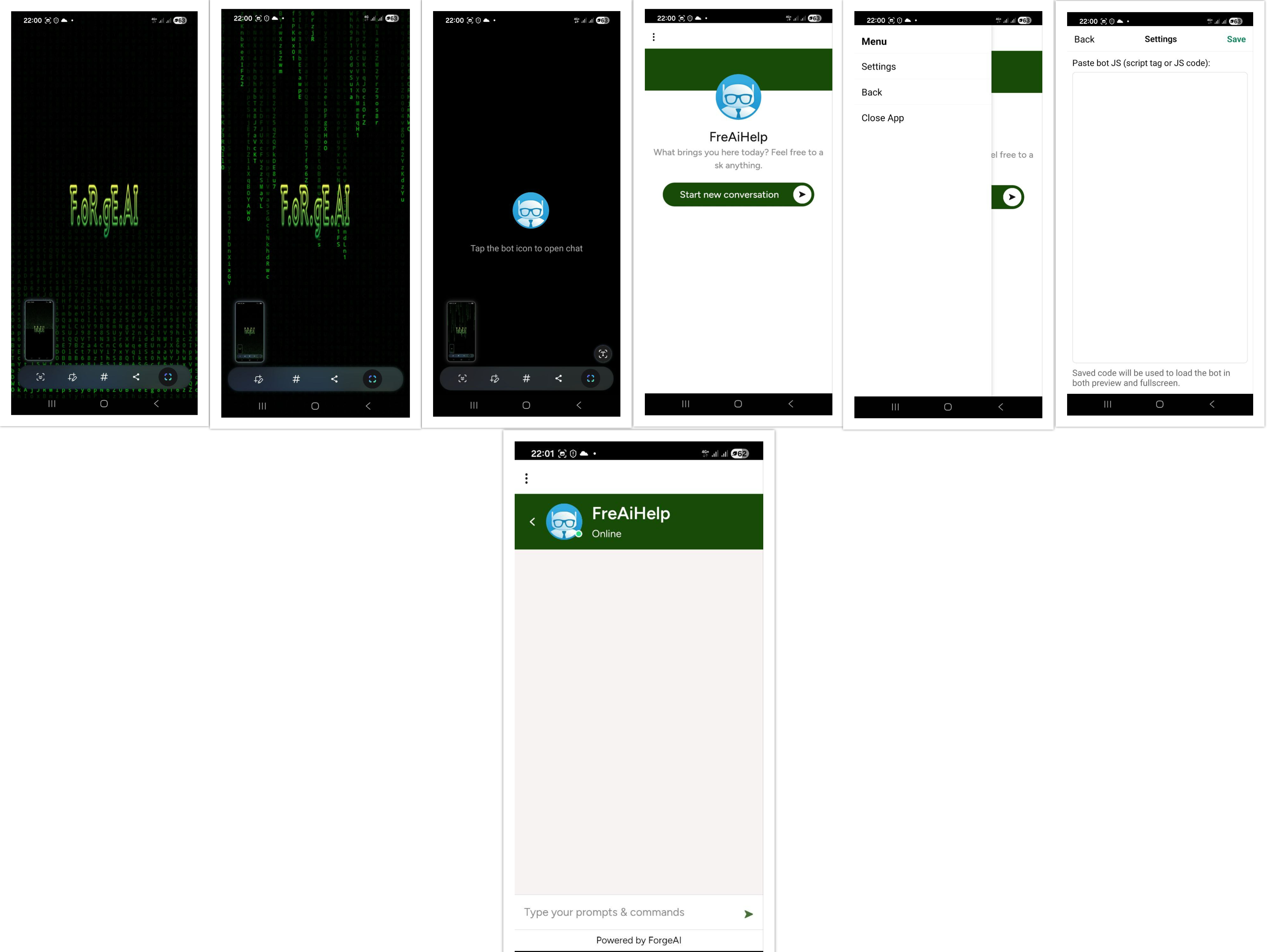
Introducing the Fre-AI Android App: Your AI Chatbot, Now in Your Pocket
We’re thrilled to announce the official launch of the Fre-AI Android App, designed to bring your personal AI chatbot directly to your mobile device.
With this release, users of the Fre-AI platform can now seamlessly interact with their customized AI assistants anytime, anywhere — all within a sleek, intuitive mobile interface.
What’s New
The Fre-AI Android App allows you to connect, chat, and manage your custom AI bot with the same functionality you enjoy on the web version. Every chatbot you’ve created on the Fre-AI platform can now live inside the mobile app — offering a truly portable AI experience.
Once logged in, users gain access to their AI dashboard, including direct chat, bot settings, and customization options. The app is lightweight, optimized for speed, and supports all Fre-AI integrations used on desktop.
How It Works
After downloading and installing the Fre-AI app, users can instantly access their AI bot using their Fre-AI credentials.
To display your personal chatbot inside the app, simply open the Settings panel and paste your JavaScript embed code (the same code you use for your website or web widget). Once saved, your chatbot will appear inside the app — styled and functioning exactly as you designed it.
This integration allows you to use Fre-AI as your own branded assistant platform, meaning your bot can act as a digital representative, tutor, or creative partner directly from your phone.
Why It Matters
Until now, Fre-AI users interacted with their chatbots primarily through the web platform. The new mobile experience brings a new level of accessibility and independence — ideal for content creators, developers, and businesses who want to manage or demo their AI assistant on the go.
With the Fre-AI Android App, your AI isn’t just an online service anymore — it becomes a personal mobile companion that adapts to your needs, wherever you are.
Getting Started
-
Download the Fre-AI Android App from the official Fre-AI website or the Google Play Store (coming soon).
-
Log in using your existing Fre-AI account.
-
Go to Settings → Embed Code, paste your JavaScript chatbot code, and save.
-
Your AI assistant will appear and be ready for use instantly.
You can then customize your bot’s look, tone, and functionality directly within your account — changes are automatically synced between web and mobile.
What’s Next
We’re continuously improving the Fre-AI ecosystem. The next updates will introduce push notifications, voice interaction, and multi-bot management, empowering users to run and switch between multiple chatbots effortlessly.
Whether you’re an entrepreneur, teacher, writer, or developer, the Fre-AI App ensures your AI assistant is always within reach — ready to respond, create, and assist whenever inspiration strikes.
Download Fre-AI App Today
Experience a new way to connect with your AI — smarter, faster, and more personal than ever before.
Your chatbot, your design, your control — now in your pocket.
Visit Fre-AI.com to learn more and start your mobile AI journey today.

Fre-Ai is a visionary platform. With innovative AI solutions and a commitment to accessibility, it empowers users to achieve digital greatness, shaping the future of technology.
Share on:
Related posts

13-11-2025
KIMI K2 – The Open Mind of a New AI Era